Automated Calculations with Computable Variables
Computable variables are special variables whose values are not asked for but are automatically calculated based on other answers. They are perfect for totals, taxes, formatted dates, or any value derived from other inputs.
This keeps your templates clean and centralizes your business logic in the config.yml file.
If you want to see computables introduced gradually first, the interactive tutorial is the gentler starting point. This guide is the full reference-and-patterns version.
Overview of Computable Variables
VIBE supports two types of computable variables:
- Inline expressions - Simple Python expressions for basic calculations
- Function-based computations - Complex logic with full IDE support and debugging
Computable variables are automatically calculated when their dependencies are available and integrate seamlessly with VIBE's dynamic probing mechanism.
Method 1: Inline Expressions (compute)
For simple, one-line calculations, use the compute key. The expression is standard Python.
questions:
  base_price:
    type: number
    label: Base Price
  tax_rate:
    type: number
    label: Tax Rate (%)
    default: 8.5
    required: false
  quantity:
    type: number
    label: Quantity
    min: 1
    default: 1
    required: false

  # Basic calculations
  subtotal:
    type: computable
    compute: "base_price * quantity"

  tax_amount:
    type: computable
    compute: "subtotal * tax_rate / 100"

  # Conditional logic in expressions
  discount_amount:
    type: computable
    compute: "subtotal * 0.1 if quantity > 10 else 0"

  # Final total using multiple computed values
  total_price:
    type: computable
    compute: "subtotal + tax_amount - discount_amount"

  # String formatting
  formatted_total:
    type: computable
    compute: "f'${total_price:,.2f}'"

  # Boolean logic
  is_bulk_order:
    type: computable
    compute: "quantity >= 100"
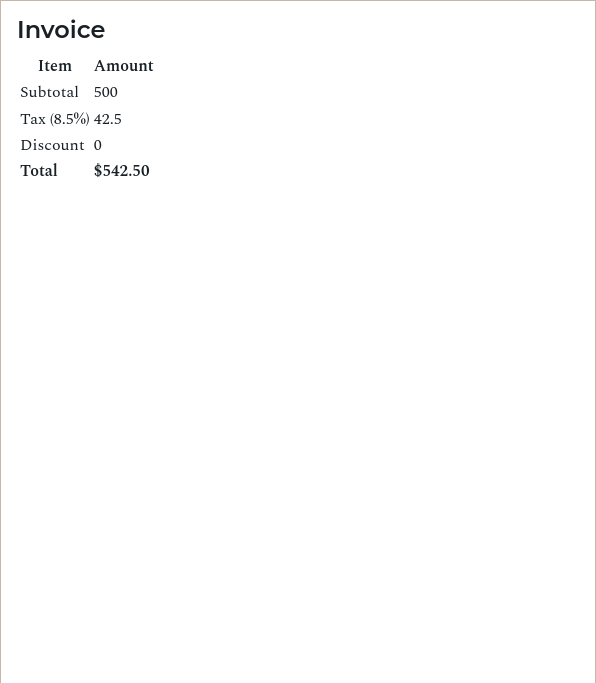
In your template, you can now simply use {{ tax_amount }}, {{ total_price }}, and {{ formatted_total }} as if they were regular variables. VIBE automatically calculates them when their dependencies are available.
Method 2: Function-Based Computations (compute_function)
For more complex, multi-step logic, you can use a Python function.
Step 1: Define the computable in config.yml
# config.yml
questions:
  shipping_cost:
    type: computable
    compute_function: calculate_shipping_cost

  final_price_display:
    type: computable
    compute_function: get_final_price_display
Step 2: Create a computations.py file
In the same folder as your config.yml, create a file named computations.py.
Step 3: Write the Python functions
# computations.py

def calculate_shipping_cost(ctx):
    """
    Calculate shipping with complex business rules.
    'ctx' is an object that gives you access to all other answers.
    """
    weight = ctx.weight
    destination = ctx.shipping_destination
    shipping_speed = ctx.shipping_speed

    # Base cost by weight
    if weight <= 1:
        base_cost = 5.99
    elif weight <= 10:
        base_cost = 12.99
    else:
        base_cost = 25.99

    # Express shipping multiplier
    if shipping_speed == "express":
        base_cost *= 1.5

    # Distance-based adjustment
    if destination == "international":
        base_cost += 15.00
    elif destination == "remote":
        base_cost += 10.00

    return round(base_cost, 2)

def get_final_price_display(ctx):
    """
    Calculates a final price and returns a formatted string.
    """
    total = ctx.total_price
    shipping = ctx.shipping_cost

    # Apply discount for premium customers
    if hasattr(ctx, 'customer_type') and ctx.customer_type == 'premium':
        total = total * 0.90  # 10% discount

    final_total = total + shipping

    # Return a nicely formatted string
    return f"Total Due: ${final_total:,.2f} (includes ${shipping:.2f} shipping)"
Key Features of Computable Variables
Automatic Dependency Discovery:
You do not need to tell VIBE what variables your computation depends on. The engine automatically detects them through VIBE's probing mechanism:
def calculate_complex_total(ctx):
    total = ctx.base_amount

    # These dependencies are discovered automatically
    if ctx.customer_type == "premium":
        total += ctx.premium_fee  # Only asked if customer_type is "premium"

    if ctx.shipping_required:
        total += ctx.shipping_cost  # Only asked if shipping_required is True

    return total
Conditional Dependencies:
Dependencies are only discovered when the conditional logic is actually executed. This enables sophisticated conditional questioning:
def calculate_tax(ctx):
    base_tax = ctx.base_price * 0.08

    # CA excise duty is only discovered as a dependency
    # when shipping_state is actually "CA"
    if ctx.shipping_state == "CA":
        base_tax += ctx.ca_excise_duty

    return base_tax
When shipping_state is "NY", the ca_excise_duty question won't appear. When changed to "CA", it will automatically become relevant.
Nested Dependencies:
Computable variables can depend on other computed values:
# Step 1: Basic calculation
subtotal:
  type: computable
  compute: quantity * unit_price

# Step 2: Tax calculation using subtotal
tax_amount:
  type: computable
  compute: subtotal * tax_rate / 100

# Step 3: Final total using both computed values
final_total:
  type: computable
  compute_function: calculate_final_total
def calculate_final_total(ctx):
    total = ctx.subtotal + ctx.tax_amount

    # Apply discount if applicable
    if hasattr(ctx, 'discount_code') and ctx.discount_code:
        total *= 0.9  # 10% discount

    return total
Security and Safety
Expression Safety:
Inline expressions are executed in a restricted environment with only safe built-in functions:
Allowed functions:
- Math:
len,min,max,round,abs,sum - Type conversion:
str,int,float,bool - Collections:
all,any,sorted,reversed,range,enumerate,zip
Prohibited:
- Import statements
- File operations
- Network access
- Arbitrary function calls
Function Safety:
Functions in computations.py run with the same restricted built-ins for security. No external imports are available by default.
Template Integration
Using in Templates:
Computable variables work exactly like regular variables in your templates:
# Invoice Template

**Base Price:** ${{ base_price }}
**Quantity:** {{ quantity }}
**Subtotal:** ${{ subtotal }}
**Tax Rate:** {{ tax_rate }}%
**Tax Amount:** ${{ tax_amount }}
**Discount:** ${{ discount_amount }}
**Shipping:** ${{ shipping_cost }}

{% if shipping_state == "CA" %}
**CA Excise Duty:** ${{ ca_excise_duty }}
{% endif %}

**Final Total:** {{ final_price_display }}
Preview Behavior:
During template preview, computable variables show computed values when all dependencies are available, or helpful placeholders when dependencies are missing:
Computing: base_price * tax_rate / 100(inline expression)Computing: calculate_total()(function-based)
Best Practices
When to Use Each Approach:
Use inline expressions for:
- Simple arithmetic calculations
- Basic conditional logic
- String formatting with f-strings
- Single-line computations
# Good candidates for inline expressions
tax_amount:
  type: computable
  compute: base_price * tax_rate / 100

formatted_price:
  type: computable
  compute: f'${total_price:.2f}'

is_bulk_order:
  type: computable
  compute: quantity >= 100

discount_rate:
  type: computable
  compute: 0.15 if customer_type == 'premium' else 0.05
Use function-based computations for:
- Multi-step calculations
- Complex conditional logic
- Code that benefits from IDE support
- Logic you want to unit test
- Computations that need debugging
# Good candidates for functions
def calculate_project_cost(ctx):
    """Calculate project cost with conditional add-ons."""
    base_cost = ctx.base_hours * ctx.hourly_rate

    # Rush job surcharge - only asks for rush_multiplier if needed
    if ctx.is_rush_job:
        base_cost *= ctx.rush_multiplier

    # Travel expenses - only relevant for on-site projects
    if ctx.project_location == "on_site":
        base_cost += ctx.travel_expenses

        # International travel has additional fees
        if ctx.is_international:
            base_cost += ctx.international_fees

    # Complexity bonus - only for complex projects
    if ctx.complexity_level == "high":
        base_cost += ctx.complexity_bonus

    return round(base_cost, 2)
IDE Support and Debugging:
Function-based computations provide full IDE support:
- Syntax highlighting - Full Python syntax support
- Code completion - Auto-complete for
ctx.attributes - Debugging - Set breakpoints and inspect variables
- Refactoring - Rename variables, extract methods, etc.
- Type hints - Add type annotations for better tooling
def calculate_total(ctx) -> float:
    """Calculate total with type hints for better IDE support."""
    base: float = ctx.base_price
    tax: float = ctx.tax_amount

    # Set breakpoint here to inspect values during development
    total = base + tax

    return round(total, 2)
Advanced Examples
Multi-step Financial Calculation:
questions:
  base_amount:
    label: Base Amount
    type: number
  tax_rate:
    label: Tax Rate (%)
    type: number
    default: 8.5
    required: false
  customer_type:
    label: Customer Type
    type: select
    options:
      - regular
      - premium
      - enterprise

  # Step-by-step calculations
  subtotal:
    type: computable
    compute: "base_amount + (base_amount * tax_rate / 100)"

  discount_amount:
    type: computable
    compute_function: "calculate_discount"

  final_total:
    type: computable
    compute: "subtotal - discount_amount"

  formatted_total:
    type: computable
    compute: "f'${final_total:,.2f}'"
# computations.py
def calculate_discount(ctx):
    """Calculate discount based on customer type and amount."""
    subtotal = ctx.subtotal

    if ctx.customer_type == "premium":
        return subtotal * 0.05  # 5% discount
    elif ctx.customer_type == "enterprise":
        if subtotal > 10000:
            return subtotal * 0.15  # 15% for large enterprise orders
        else:
            return subtotal * 0.10  # 10% for smaller enterprise orders

    # Regular customers get discount only on large orders
    if subtotal > 5000:
        return subtotal * 0.02  # 2% discount

    return 0.0
Error Handling and Troubleshooting
Automatic Error Handling:
If a computation fails due to missing dependencies, VIBE automatically:
- Identifies the missing variable
- Adds it to the list of questions to ask
- Retries the computation when the dependency becomes available
You don't need to handle missing variables explicitly - the system does it automatically.
Common Issues:
Expression Syntax Errors:
# ❌ Wrong - invalid Python syntax
tax_amount:
  type: computable
  compute: base_price * tax_rate / 100)  # Extra parenthesis

# ✅ Correct
tax_amount:
  type: computable
  compute: base_price * tax_rate / 100
Function Not Found:
# ❌ Wrong - function name doesn't match
def calcuate_total(ctx):  # Typo in function name
    return ctx.base_price * 1.1
# This will fail because function name doesn't match
total:
  type: computable
  compute_function: calculate_total  # Looking for "calculate_total"
Debugging Tips:
- Use simple expressions first - Start with inline expressions and move to functions when needed
- Test incrementally - Add one computation at a time
- Use print statements - Add temporary print statements in functions (remove before production)
- Check dependencies - Make sure all referenced variables are defined in
questions - Verify function names - Ensure function names exactly match the
compute_functionvalue
Performance Considerations
- Computations are cached and only recalculated when dependencies change
- Inline expressions are generally faster than function calls
- Complex computations only run when their dependencies are available
- Conditional dependencies optimize question relevance
Computable Variables vs Inline Calculations
You might be tempted to put calculations directly in your template using Jinja expressions. Computable variables are a better choice for most situations:
Inline calculation (in the template):
**Tax:** ${{ (base_price * tax_rate / 100) | round(2) }}
**Total:** ${{ ((base_price * tax_rate / 100) + base_price) | round(2) }}
Computable variable (in config.yml):
# questions
tax_amount:
  type: computable
  compute: round(base_price * tax_rate / 100, 2)

total:
  type: computable
  compute: round(base_price + tax_amount, 2)
The computable approach keeps your template clean and readable, lets you chain calculations (like total using tax_amount), and allows VIBE to track dependencies automatically so the right questions appear at the right time.