Generating Appendices and Annexes
When creating professional documents like contracts, reports, or proposals, you often need separate supporting documents—appendices, annexes, schedules, or addendums. VIBE's appendices system lets you create these additional documents that are generated conditionally and delivered as separate files.
What Can You Do With Appendices?
- Document Packages: Generate main contracts with separate pricing schedules, SLA agreements, or technical specifications
- Conditional Content: Only create appendices when needed based on user answers
- Separate Downloads: Users can download individual appendices or the complete document package
- Hierarchical Organization: Create nested structures like "Appendix A" with "Addendum A.1"
- Reusable Modules: Use the same appendix components across different templates
What Are Appendices?
An appendix in VIBE is a special type of component that generates a separate document instead of being embedded in the main template. Appendices:
- Are created using the existing component system you already know
- Have their own questions that appear in the interview when relevant
- Are automatically numbered (A, B, C... or 1, 2, 3...)
- Can reference each other in hierarchical relationships
- Are downloaded individually or bundled together
Creating Your First Appendix
Step 1: Create an Appendix Component
Create a component with the special output field that marks it as an appendix:
# components/pricing_schedule/component.yml
output: Appendix-{{ ref.numbering }}-{{ ref.label|slugify }}.docx
# ref is the reference object returned by appendix() — explained in detail below
# in "The appendix() Function"
label: Pricing Schedule
description: Detailed pricing breakdown for services

questions:
  unit_price:
    type: number
    label: Price per unit
    min: 0
  currency:
    type: select
    label: Currency
    options:
      - USD
      - EUR
      - GBP
    default: USD
    required: false
  volume_discount:
    type: bool
    label: Apply volume discount?
    default: false
    required: false
The output field tells VIBE this component should create a separate file. The filename can use Jinja templating with special variables like ref.numbering and ref.label.
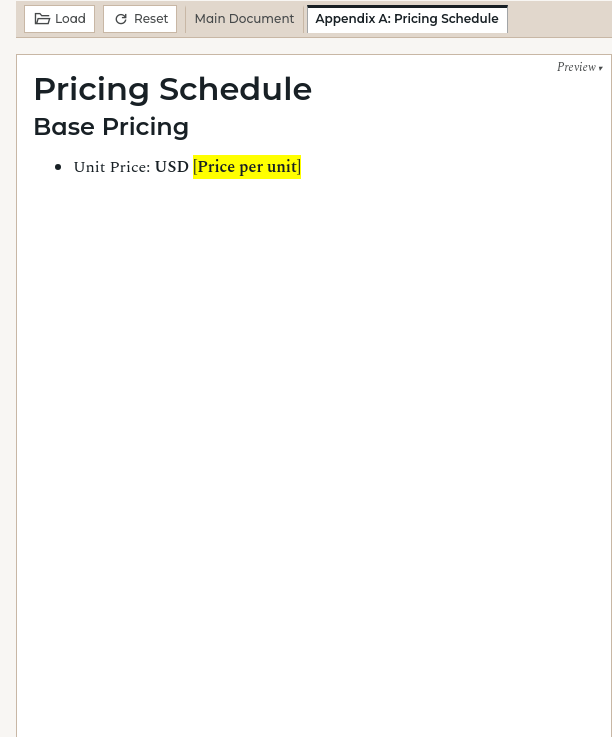
# Pricing Schedule

## Base Pricing
- Unit Price: **{{ currency }} {{ unit_price }}**

{% if volume_discount %}
- Volume Discount: **10% for orders over 100 units**
{% endif %}

{% if currency == "EUR" %}
*All prices include applicable VAT*
{% endif %}
Step 2: Reference the Appendix in Your Main Template
Use the appendix() function (similar to insert() but for separate documents):
# Service Agreement

This agreement covers the following services between {{ client_name }} and our company.

{% if contract_type == 'enterprise' %}
  {% set pricing_ref = appendix('pricing_schedule', alias='main_pricing') %}
{% endif %}

## Terms and Conditions
[Your main agreement content here...]

## Appendices

{% if pricing_ref is defined %}
* Appendix {{ pricing_ref.numbering }}: {{ pricing_ref.label }}
{% endif %}
questions:
  contract_type:
    type: select
    label: Contract Type
    options:
      - basic
      - enterprise

  client_name:
    type: text
    label: Client Name
Step 3: Test Your Appendix
- Start VIBE:
vibe run - Navigate to your template
- Select "enterprise" for contract type
- Notice:
- Pricing questions appear in a grouped section
- A "Pricing Schedule" tab appears in the preview
- Download dropdown shows both main document and appendix options
The appendix() Function
The appendix() function is your primary tool for including appendices:
Required Parameters:
component_id: The ID of your appendix componentalias: A unique name for this appendix instance (required for question namespacing)
Why the alias? If you use the same appendix component multiple times with different data, each instance needs a unique alias to avoid question conflicts.
Reference Object Properties
The appendix() function returns a reference object with useful properties:
{% set pricing_ref = appendix('pricing_schedule', alias='main_pricing') %}

{{ pricing_ref.numbering }}     <!-- A, B, C... or 1, 2, 3... -->
{{ pricing_ref.label }}         <!-- "Pricing Schedule" from component.yml -->
{{ pricing_ref.component_id }}  <!-- "pricing_schedule" -->
Advanced Features
Hierarchical Appendices
Create nested appendix structures for complex documents:
# components/sla_appendix/component.yml
output: Appendix-{{ ref.numbering }}-SLA.docx
label: Service Level Agreement
questions:
  uptime_guarantee:
    type: number
    label: Uptime guarantee (%)
    min: 95
    max: 100
    default: 99.9
    required: false
  is_international:
    type: bool
    label: International agreement?
    required: false
# components/international_addendum/component.yml
output: Addendum-{{ ref.numbering }}-International.docx
label: International SLA Addendum
questions:
  data_residency:
    type: select
    label: Data residency
    options:
      - EU
      - US
      - UK
  compliance_frameworks:
    type: multiselect
    label: Required compliance
    options:
      - GDPR
      - SOC2
      - ISO27001
    required: false
<!-- In your main template -->
{% if include_sla %}
  {% set sla_ref = appendix('sla_appendix', alias='main_sla') %}

  {% if _appendices.main_sla.is_international %}
    {% set intl_ref = appendix('international_addendum',
                               alias='intl_addendum',
                               parent=sla_ref) %}
  {% endif %}
{% endif %}

## Appendices
{% if sla_ref is defined %}
* Appendix {{ sla_ref.numbering }}: {{ sla_ref.label }}
  {% if intl_ref is defined %}
  * Addendum {{ intl_ref.numbering }}: {{ intl_ref.label }}
  {% endif %}
{% endif %}
This creates a hierarchy like:
- Appendix A: Service Level Agreement
- Addendum A.1: International SLA Addendum
Custom File Naming
Control exactly how your appendix files are named:
# Basic naming
output: pricing-schedule.docx

# Dynamic naming with variables
output: {{ client_name|upper }}-Appendix-{{ ref.numbering }}.docx
# Results in: ACME-CORP-Appendix-A.docx

# Conditional naming
output: >
  {% if contract_type == 'enterprise' %}
    Enterprise-{{ ref.numbering }}-{{ ref.label }}.docx
  {% else %}
    Standard-{{ ref.numbering }}-{{ ref.label }}.docx
  {% endif %}
Passing Data to Appendices
Use the inputs system to pass specific data to appendix components:
# components/pricing_schedule/inputs.yml
currency_symbol:
  from: billing_currency
  default: $
tax_rate:
  from: applicable_tax_rate
  default: 0.0
<!-- Pass data when creating the appendix -->
{% set pricing_ref = appendix('pricing_schedule',
                             alias='main_pricing',
                             currency_symbol='€',
                             tax_rate=0.21) %}
User Interface Features
When appendices are active, users see:
Question Panel:
- Appendix questions grouped under clear headings
- Progress indicators for each appendix
- Hierarchical display for nested appendices
Preview Pane:
- Tabbed interface with "Main Document" + appendix tabs
- Each tab shows the rendered content
- On-demand loading for better performance
Download Options:
- "Download All (.zip)" for complete document package
- Individual appendix downloads
- Clearly labeled files with smart naming
Best Practices
Naming Conventions
Component IDs: Use descriptive snake_case names
Aliases: Use contextual names that make sense
{% set ref = appendix('pricing_schedule', alias='main_pricing') %}     ✓
{% set ref = appendix('pricing_schedule', alias='pricing_v2') %}       ✓
{% set ref = appendix('pricing_schedule', alias='x') %}                ✗
Output Filenames: Include numbering and be descriptive
output: "Appendix-{{ ref.numbering }}-{{ ref.label|slugify }}.docx"   ✓
output: "{{ ref.label }}.docx"                                        ✗
Organizing Appendix Components
Keep your components organized by purpose:
components/
├── legal/
│   ├── privacy_policy/
│   ├── terms_conditions/
│   └── liability_waiver/
├── pricing/
│   ├── standard_pricing/
│   ├── enterprise_pricing/
│   └── volume_discounts/
└── technical/
    ├── sla_terms/
    ├── security_addendum/
    └── data_processing/
Question Design
Keep appendix questions focused and self-contained:
# Good: Focused appendix questions
questions:
  unit_price:
    type: number
    label: Unit price
  payment_terms:
    type: select
    label: Payment terms
    options:
      - 30 days
      - 60 days
      - 90 days
  late_fee_percentage:
    type: number
    label: Late fee (%)
    min: 0
    max: 10
    required: false
Template Structure
Write appendix templates to be self-contained and clear:
<!-- Good: Clear, self-contained appendix -->
# Pricing Schedule

## Pricing Structure
Base price: {{ currency }} {{ unit_price }}

{% if volume_discount_applicable %}
## Volume Discounts
Orders over {{ volume_threshold }} units: {{ volume_discount }}% off
{% endif %}

## Payment Terms
Payment due: {{ payment_terms }}
{% if late_fee_percentage > 0 %}
Late fee: {{ late_fee_percentage }}% per month
{% endif %}
Common Patterns
Enterprise vs. Basic Agreements
{% if contract_type == 'enterprise' %}
  {% set pricing_ref = appendix('enterprise_pricing', alias='pricing') %}
  {% set sla_ref = appendix('enterprise_sla', alias='sla') %}
  {% set support_ref = appendix('premium_support', alias='support') %}
{% elif contract_type == 'basic' %}
  {% set pricing_ref = appendix('basic_pricing', alias='pricing') %}
{% endif %}
Regional Variations
{% set main_terms = appendix('general_terms', alias='terms') %}

{% if jurisdiction == 'EU' %}
  {% set gdpr_ref = appendix('gdpr_compliance', alias='gdpr', parent=main_terms) %}
{% elif jurisdiction == 'US' %}
  {% set privacy_ref = appendix('us_privacy', alias='privacy', parent=main_terms) %}
{% endif %}
Complex Service Agreements
<!-- Base services appendix -->
{% set services_ref = appendix('core_services', alias='services') %}

<!-- Conditional add-on services -->
{% if include_consulting %}
  {% set consulting_ref = appendix('consulting_services',
                                   alias='consulting',
                                   parent=services_ref) %}
{% endif %}

{% if include_training %}
  {% set training_ref = appendix('training_services',
                                 alias='training',
                                 parent=services_ref) %}
{% endif %}
Troubleshooting
Appendix Questions Not Appearing
Problem: Questions from appendix components don't show in the interview.
Check:
- Does the component have an
outputfield incomponent.yml? - Is the
appendix()call inside a condition that evaluates totrue? - Is the component ID spelled correctly?
<!-- Debug: Add temporary debug output -->
{% if include_pricing %}
  <!-- Pricing appendix will be included -->
  {% set pricing_ref = appendix('pricing_schedule', alias='main_pricing') %}
{% else %}
  <!-- Pricing appendix skipped -->
{% endif %}
Incorrect Numbering
Problem: Appendix numbering is wrong or inconsistent.
Solution: Check the order of appendix() calls and parent relationships:
<!-- Good: Clear order -->
{% set terms_ref = appendix('terms', alias='main_terms') %}
{% set pricing_ref = appendix('pricing', alias='pricing') %}
{% set sla_ref = appendix('sla', alias='sla') %}

<!-- Bad: Conditional calls can change order -->
{% if condition_a %}
  {% set ref_a = appendix('comp_a', alias='a') %}
{% endif %}
{% set ref_b = appendix('comp_b', alias='b') %}  <!-- Number depends on condition_a -->
File Download Issues
Problem: Appendix files not downloading correctly.
Check:
-
Output filename template syntax:
-
Appendix template renders without errors
-
All required variables are available
Validation Errors
Use VIBE's validation tools to catch issues:
# Validate your main template
vibe validate my_template

# Validate appendix components
vibe validate-components pricing_schedule
Summary
VIBE's appendices system provides powerful capabilities for creating professional document packages:
- Use the
outputfield to mark components as appendices - Always provide an
aliasfor proper question namespacing - Reference conditionally and check if appendices are defined
- Leverage hierarchical numbering for complex structures
- Follow naming conventions for maintainable templates
The system integrates seamlessly with VIBE's existing features while adding the professional document generation capabilities you need for complex templates.