Reusable Data with definitions
As you build templates, you'll notice you're defining the same group of questions over and over. For example, a "person" might always have a name, email, and phone number. A "company" always has a legal name, registration number, and address.
The definitions block in config.yml lets you define these reusable data structures once, and then use them throughout your project.
Definitions pair well with components. If you want reusable presentation plus reusable data, see Reuse with Components after this guide.
Creating Your First Definition
In config.yml, add a top-level block called definitions. Inside it, you can define your reusable structures.
# config.yml

definitions:
  # A simple definition for contact information
  contact_definition:
    full_name:
      label: Full Name
      type: text
      help: Enter the person's complete name
    email:
      label: Email Address
      type: email
      required: false
    phone:
      label: Phone Number
      type: text
      required: false

  # A simple definition for address information
  address_definition:
    street:
      label: Street Address
      type: text
    city:
      label: City
      type: text
    country:
      label: Country
      type: select
      options:
        - USA
        - Canada
        - UK
        - Australia
Composing Complex Definitions
Definitions can reference other definitions, creating powerful composition patterns:
definitions:
  # Build on the basic contact definition
  employee_definition:
    # This field uses the contact_definition
    personal_info:
      label: Personal Information
      type: structured
      definition: contact_definition

    # Additional fields specific to employees
    employee_id:
      label: Employee ID
      type: text
    department:
      label: Department
      type: select
      options:
        - Engineering
        - Sales
        - Marketing
        - HR

    # Work address using the address definition
    work_address:
      label: Work Address
      type: structured
      definition: address_definition
      required: false

    # List of projects (references another definition)
    projects:
      label: Assigned Projects
      type: list
      item_label: Project
      uses: project_definition
      required: false

  project_definition:
    name:
      label: Project Name
      type: text
    description:
      label: Description
      type: textarea
      required: false
    budget:
      label: Budget
      type: number
      min: 0
      required: false
Notice how employee_definition is composed of simple types and references to other definitions (contact_definition, address_definition, project_definition). This is the key to building powerful, maintainable data structures.
Recursive Definition Resolution
VIBE automatically resolves nested definition references and detects circular dependencies:
# This would cause an error:
definitions:
  a_definition:
    b_field:
      type: structured
      definition: b_definition  # References b_definition

  b_definition:
    a_field:
      type: structured
      definition: a_definition  # References a_definition - CIRCULAR!
VIBE will detect this and show a clear error:
Using Definitions in Questions
Now you can use these definitions in your questions block.
For a single structured object (type: structured)
This is for when you need to ask for one person's details.
definitions:
  contact_definition:
    full_name:
      label: Full Name
      type: text
    email:
      label: Email Address
      type: email
      required: false
    phone:
      label: Phone Number
      type: text
      required: false

questions:
  primary_contact:
    label: Primary Contact Person
    type: structured
    definition: contact_definition
    help: Main person responsible for this project

  team_members:
    label: Team Members
    type: list
    item_label: Team Member
    uses: contact_definition
    min_items: 1
    max_items: 5
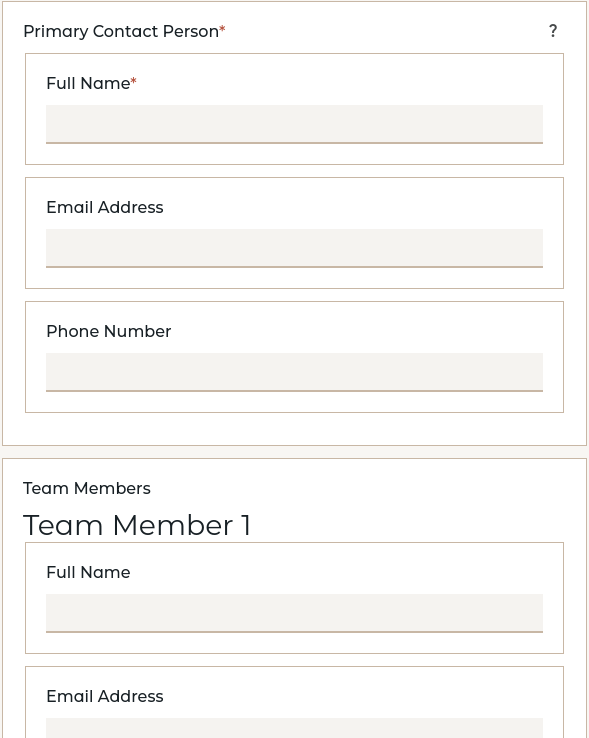
VIBE will automatically generate all the necessary fields, including nested structures. A structured question creates one set of fields; a list question lets the user add multiple items with the same shape.
The original two-question pattern uses separate config blocks:
For a single structured object (type: structured)
This is for when you need to ask for one person's details.
questions:
  primary_contact:
    label: Primary Contact Person
    type: structured
    definition: contact_definition
    help: Main person responsible for this project

  project_manager:
    label: Project Manager
    type: structured
    definition: employee_definition
VIBE will automatically generate all the necessary fields, including nested structures.
For a list of objects (type: list)
This is for when you need to ask for a list of multiple items.
questions:
  team_members:
    label: Team Members
    type: list
    item_label: Team Member
    uses: contact_definition
    min_items: 1
    max_items: 10

  departments:
    label: Company Departments
    type: list
    item_label: Department
    uses: employee_definition
    required: false
Template Access Patterns
Access definition-based data in templates using dot notation:
# Primary Contact
**Name:** {{ primary_contact.full_name }}
**Email:** {{ primary_contact.email }}
**Phone:** {{ primary_contact.phone }}

# Project Manager (nested structure)
**Manager:** {{ project_manager.personal_info.full_name }}
**Department:** {{ project_manager.department }}
**Employee ID:** {{ project_manager.employee_id }}
**Work Address:** {{ project_manager.work_address.street }}, {{ project_manager.work_address.city }}

# Team Members (list)
{% for member in team_members %}
- **{{ member.full_name }}** ({{ member.email }})
{% endfor %}

# Project assignments (nested list)
{% for project in project_manager.projects %}
- **{{ project.name }}**: {{ project.description }}
  Budget: ${{ project.budget }}
{% endfor %}
Linking Components to Definitions
This is where the system's power becomes clear. You can create a file-based component and declare that it operates on a specific data definition. This formalizes the "data contract" for your component.
Basic Component-Definition Linking:
components/contact_card/component.yml
# This component inherits all fields from contact_definition
uses: contact_definition

# The component automatically gets these inputs:
# - full_name
# - email
# - phone
components/contact_card/template.md
<div class="contact-card">
  <h4>{{ full_name }}</h4>
  <p>Email: {{ email }}</p>
  {% if phone %}<p>Phone: {{ phone }}</p>{% endif %}
</div>
Extending Definitions in Components:
Components can add additional fields to a definition:
# components/employee_card/component.yml
uses: contact_definition

# Add fields beyond the base definition
inputs:
  department:
    label: Department
    type: select
    options:
      - Engineering
      - Sales
      - Marketing

  hire_date:
    label: Hire Date
    type: date
    required: false

# Component-specific questions
questions:
  show_hire_date:
    label: Show hire date on card?
    type: bool
The component now has all contact_definition fields PLUS department and hire_date.
Host Template Integration:
When you use a component that links to a definition, the host template gets namespaced questions:
Resulting questions in host template:
company_name(from host template)emp_info.full_name(from contact_definition via employee_card component)emp_info.email(from contact_definition via employee_card component)emp_info.phone(from contact_definition via employee_card component)emp_info.department(from employee_card component inputs)emp_info.hire_date(from employee_card component inputs)emp_info.show_hire_date(from employee_card component questions)
Form Data Processing
The system automatically handles form data mapping:
- Browser form field names:
emp_info.full_name,emp_info.email - Session data storage:
{ "emp_info": { "full_name": "John Doe", "email": "john@example.com" } } - Component context:
{ "full_name": "John Doe", "email": "john@example.com" }
Conflict Detection and Resolution
Components cannot override definition fields with conflicting types:
# This would cause an error:
uses: contact_definition

inputs:
  full_name:  # ERROR: Conflicts with contact_definition.full_name
    label: Different Name Label
    type: number  # Conflicts with text type in definition
    required: false
VIBE generates a clear error:
Input 'full_name' conflicts with definition field: definition has type 'text', input has type 'number'
Valid extensions are allowed:
# This is OK - adds new fields or extends compatibly
uses: contact_definition

inputs:
  # This is OK - adds a new field
  employee_id:
    label: Employee ID
    type: text

  # This is OK - same type, compatible constraints
  full_name:
    label: Full Name (Employee)
    type: text
    help: Employee's full legal name
Advanced Definition Patterns
Multi-Level Composition:
definitions:
  # Base contact information
  contact_definition:
    name:
      label: Name
      type: text
    email:
      label: Email
      type: email
      required: false

  # Employee extends contact
  employee_definition:
    personal_info:
      label: Personal Information
      type: structured
      definition: contact_definition
    employee_id:
      label: Employee ID
      type: text
    department:
      label: Department
      type: text

  # Manager extends employee
  manager_definition:
    employee_info:
      label: Employee Information
      type: structured
      definition: employee_definition
    team_size:
      label: Team Size
      type: number
      min: 1
    budget_authority:
      label: Budget Authority
      type: number
      min: 0
      required: false
Component Variants:
Create multiple component variants for different use cases:
# components/basic_contact/component.yml
uses: contact_definition
inputs: {}

# components/employee_contact/component.yml
uses: contact_definition
inputs:
  department:
    label: Department
    type: text

# components/manager_contact/component.yml
uses: contact_definition
inputs:
  department:
    label: Department
    type: text
  team_size:
    label: Team Size
    type: number
    min: 1
Best Practices for Definitions
Definition Design:
- Single Responsibility: Each definition should represent a cohesive data structure
- Reusability: Design definitions for maximum reuse across different contexts
- Semantic Naming: Use clear, descriptive names ending with
_definition - Logical Grouping: Group related fields together within definitions
Template Organization:
- Definition First: Define your data structures before creating questions
- Logical Ordering: Place definitions at the top of
config.yml - Consistent Usage: Use the same definition across related components
- Clear Separation: Keep definitions, questions, and component configuration distinct
When to Use Definitions:
If multiple questions share the same fields, a definition avoids repetition and keeps them in sync. Compare these two approaches:
Inline fields (repetitive):
questions:
  manager:
    type: structured
    fields:
      name:
        type: text
      email:
        type: email
        required: false

  contact:
    type: structured
    fields:
      name:
        type: text
      email:
        type: email
        required: false
Definition-based (recommended):
definitions:
  person_definition:
    name:
      type: text
    email:
      type: email
      required: false

questions:
  manager:
    type: structured
    definition: person_definition

  contact:
    type: structured
    definition: person_definition
The definition-based approach is easier to maintain, keeps field structures consistent, and enables powerful component integration patterns.