Reuse with Components
Components are reusable, modular pieces of your templates. Define a clause once, use it in ten different agreements. Update it in one place, and the change applies everywhere.
Why Use Components?
- Reusability: Write a clause once, include it wherever you need it.
- Modularity: Break a long document into manageable, named sections.
- Maintainability: Fix wording in one component, and every template that uses it benefits.
- Consistency: Ensure standard language is applied the same way everywhere.
- Encapsulation: Components can own their own interview questions, keeping internal details out of the host template.
Terminology & Concepts
To understand components, it helps to distinguish between the "Host" and the "Component":
- Host Template: The main document you are writing. This is the template that initiates the inclusion of a component using
{{ insert() }}. It usually has its ownconfig.yml. - Component: The reusable file (or folder of files) being injected into the Host. Complex components have their own
component.ymlto define their behavior.
Two Approaches to Components Components support different design philosophies. You will typically build them in one of two ways:
- Snippets / Fine-Grained Clauses: Simple text files or a library of small, focused clauses. The Host template author selects exactly which provisions to include and controls the document structure.
- Self-Contained Sections (Mini-Interviews): A single component that handles an entire complex topic (like a full NDA section). The component owns its own interview questions and internal logic, hiding the complexity from the Host.
1. The Basics: Plaintext Components
The simplest component is just a Markdown (.md) or Word (.docx) file with no variables at all—just text. This is useful for standard boilerplate paragraphs, disclaimers, or formatting blocks.
File Structure:
my_project/
├── template.md                  <-- (Host) You type {{ insert() }} here
└── components/
    └── boilerplate_footer.md    <-- (Component) The reusable text
components/boilerplate_footer.md
template.md (Host)
VIBE finds boilerplate_footer.md in your components/ directory and renders it inline. No configuration, no inputs, no questions.
2. Passing Data to Components
When a component needs data from the host template (like party names or dates), the Host passes it through keyword arguments in the insert() call.
File Structure:
my_project/
├── template.md                  <-- (Host)
└── components/
    └── signature_block.md       <-- (Component) Uses Jinja variables
components/signature_block.md
**Signed:** ___________________

**By:** {{ signer_name }}
**Title:** {{ signer_title }}
**Date:** {{ signing_date }}
template.md (Host)
This is explicit, readable, and always takes precedence over any other mechanism. You can pass literal values ("CEO"), host template variables (client_name), or Jinja expressions.
Note: By default, components automatically have access to variables defined in your Host template — you only need to pass them explicitly via
insert()if you want to rename them or ensure a strict data contract. See Value Precedence for the full resolution order.
3. Smart Components (Inputs vs. Questions)
To make components truly self-contained, you can place them inside their own directory alongside a component.yml file. This allows the component to define a formal interface and even ask its own interview questions.
Before creating one, you must understand the two distinct ways components receive data: Inputs and Questions.
Rule of Thumb:
- Inputs: Data the Host template provides via
insert(). (e.g., Party names, contract type, governing law). The component needs this from the outside world.- Questions: Data the Component asks the User during the interview. (e.g., "Do you prefer arbitration?", "What is the liability cap?"). The Host doesn't need to know about these internal details.
Creating a Standalone Component
Here is a component that takes an Input from the Host, but asks its own Question in the VIBE interview.
File Structure:
my_project/
├── template.md                    <-- (Host)
└── components/
    └── contact_block/
        ├── component.yml          <-- (Component config)
        └── template.md            <-- (Component output)
components/contact_block/component.yml
inputs:
  contact_name:
    type: text
    description: Full name of the contact person
  contact_email:
    type: text

questions:
  preferred_contact_method:
    label: Preferred contact method
    type: select
    options:
      - email
      - phone
components/contact_block/template.md
## Contact: {{ contact_name }}
Email: {{ contact_email }}

{% if preferred_contact_method == 'phone' %}
*Please call during business hours.*
{% endif %}
template.md (Host)
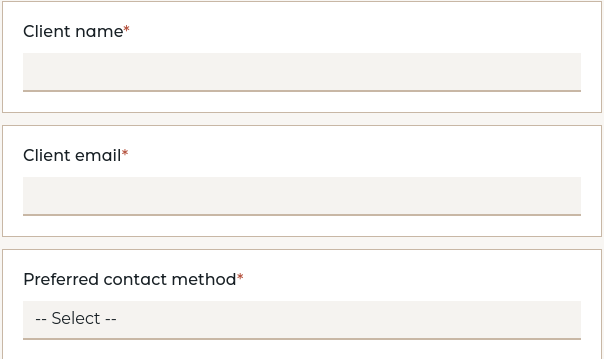
The Host provides contact_name and contact_email through the insert() call. During the interview, VIBE also prompts the user with the component's own question: "Preferred contact method". The Host author never had to code that question into their own config.yml.
Input Options
Each input declared in component.yml or collection.yml supports:
type: Expected data type (text,number,bool,date, etc.)required: Whether the host must provide a value (defaults totrue)description: Human-readable explanation of the input's purpose
Overriding Questions from the Host
Because insert() kwargs have the highest authority, they can also target a component's questions — not just its inputs. When the Host provides a value for a question, VIBE treats it as pre-answered and skips asking the user.
This is useful when the same component is used in different contexts: sometimes the user should be asked, but other times the Host already knows the answer.
{# Normal usage: user is asked for preferred_contact_method #}
{{ insert('contact_block',
    contact_name=client_name,
    contact_email=client_email) }}
{# Override: host pre-answers the question, user is not asked #}
{{ insert('contact_block',
contact_name=client_name,
contact_email=client_email,
preferred_contact_method="email") }}
This works identically for collection-level questions. For example, if a collection.yml declares a language question, the Host can override it for a specific insertion:
Precedence: Explicit
insert()mappings always take highest precedence, whether they target inputs or questions. They overridecomponent_defaults, collection defaults, and user-provided answers alike. See Value Precedence for the full resolution order.
Computables
A standalone component can also define computables for derived values:
4. Controlling the Interview Flow
When components have their own questions, you might want to control when and if those questions are asked during the user's interview. You do this using special parameters in the insert() call, prefixed with an underscore (_). The underscore tells VIBE these are instructions for the interview flow, not data variables being passed to the component.
These parameters fall into three categories:
- Visibility:
_ask,_multichoice— control whether the component's questions appear - Positioning:
_after,_follows— control where in the interview they appear - Namespacing:
_alias— allow multiple instances of the same component
Conditional Inclusion (_ask)
Use the _ask parameter to create a "gate." VIBE will automatically create a Yes/No question in the interview. The component (and its internal questions) will only be included if the user answers "Yes".
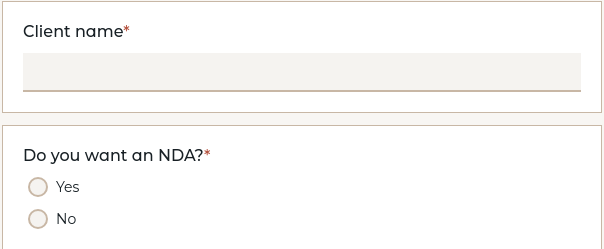
If you don't need a custom label, pass True for an auto-generated one (_ask=True).
The gate question ID is include_<alias>. When using a custom _alias, the gate follows the alias:
{{ insert("nda", _alias="confidentiality", _ask="Include confidentiality clause?") }}
{# creates the question include_confidentiality #}
Since the gate is a normal bool variable, you can reference it elsewhere in your template:
{% if include_confidentiality %}
This agreement includes a confidentiality provision (see Section 8).
{% endif %}
Note: If your template already defines a question with the same ID as the auto-generated gate (e.g.,
include_nda), VIBE reports a validation error. Remove the manual definition and let_askhandle it.
Grouped Gates (_multichoice)
When you have several optional components from the same collection, presenting each one as a separate Yes/No gate can overwhelm the user. The _multichoice parameter groups them into a single multichoice (checkbox) question instead:
{{ insert("clauses.ai", _ask="Artificial Intelligence", _multichoice="Commitments") }}
{{ insert("clauses.bench", _ask="Benchmarking", _multichoice="Commitments") }}
{{ insert("clauses.sla", _ask="Service Levels", _multichoice="Commitments") }}
All insert() calls that share the same _multichoice label are combined into one multichoice question titled "Commitments" with three checkbox options. Checking an option opens that component's gate; unchecking it closes it.
Requirements:
_multichoicerequires_ask— the_asklabel becomes the checkbox option text._multichoicecannot be combined with_follows, because a grouped checkbox question is a top-level interview element — it cannot be visually nested under another question. Use_afterto position it instead.- All members of a group that use
_aftermust agree on the same target.
Placement works the same as for standalone gates: use _after to position the group question after a specific host question, or add a config marker named after the generated question ID (e.g., _mc_commitments: true) to your config.yml.
The generated question ID is _mc_ followed by a slug of the label text (e.g., _multichoice="Commitments" produces _mc_commitments).
Positioning Questions (_after and _follows)
By default, component questions appear at the end of the interview. You can place them exactly where you want them relative to the Host's questions.
_after places the component's questions in the main interview list, directly after a specific Host question:
When combined with _ask, the gate question also appears at the _after position:
{{ insert('nda', _after='client_name', _ask="Include an NDA?") }}
{# Interview: client_name → "Include an NDA?" → NDA questions (if Yes) → ... #}
_follows makes the component's questions appear as visual sub-questions nested under a Host question:
(Note: _after and _follows are mutually exclusive).
Positioning with Config Markers (_insert_questions_)
As an alternative to _after, you can place explicit markers in your Host's config.yml to control exactly where component questions appear. The marker name is _insert_questions_ followed by the component's _alias value:
# config.yml
questions:
  client_name:
    type: text
    label: Client's Full Legal Name

  contract_value:
    type: number
    label: Total Contract Value

  # Place the signature block's questions here.
  # The suffix must match the _alias used in the insert() call.
  _insert_questions_party_a_signature: null

  final_review_date:
    type: date
    label: Date of Final Review
The interview flow becomes:
- Client's Full Legal Name
- Total Contract Value
- Component questions from signature_block (placed by the marker)
- Date of Final Review
When combined with _ask, the gate question is placed just before the component's questions at the marker position.
Multiple Instances (_alias)
If you need to insert the exact same component twice (e.g., two signature blocks), you must give each instance a unique namespace using _alias:
### Party A:
{{ insert('signature_block', _alias='party_a_sig', signer_name=party_a_name) }}

### Party B:
{{ insert('signature_block', _alias='party_b_sig', signer_name=party_b_name) }}
Each instance will now ask its questions independently.
Accessing Component Data from the Host
Using _alias groups the component's answers into a namespace in the Host's memory. The Host can reach in and read that data using the _components object:
5. Component Collections (Clause Libraries)
When you have a set of related templates that share common configuration—like a library of legal clauses—group them in a directory with a collection.yml.
File Structure:
components/
└── legal_clauses/
    ├── collection.yml
    ├── force_majeure.md
    ├── confidentiality.md
    └── governing_law.md
components/legal_clauses/collection.yml
inputs:
  GoverningLaw:
    type: text
  Jurisdiction:
    type: text
  PartyA:
    type: text

questions:
  ArbitrationPreferred:
    label: Do the parties prefer arbitration over litigation?
    type: bool
The host inserts individual templates from the collection using dot-notation:
{{ insert('legal_clauses.confidentiality', PartyA=client_name) }}

{{ insert('legal_clauses.governing_law', GoverningLaw="Swedish law") }}
How Collections Differ from Standalone Components:
- Input Scoping: The
collection.ymllists all possible inputs for the entire library. However, when you insertforce_majeure.md, VIBE only requires you to pass the specific inputs thatforce_majeure.mdactually uses. - Shared Questions: Questions declared in
collection.yml(likeArbitrationPreferred) are only asked once during the interview, even if you insert five different clauses from that collection. If you need a different value for a specific insertion, override it explicitly:
- Automatic Followup Nesting: When a collection is gated by a
_multichoicequestion, VIBE automatically nests collection questions under the relevant checkbox option if the question is referenced by exactly one component template. Questions used by two or more components (or none) remain standalone since there is no single obvious parent. This keeps the interview tidy — users only see a collection question when they have selected the component that needs it.
Shared Configuration with include
When a component library has many subdirectories that share the same inputs (e.g., party names, contract type), repeating them in every collection.yml is fragile — adding a new option means updating every file. Use include to inherit from a shared base:
components/
└── clauses/
    ├── common-inputs.yml
    ├── confidentiality/
    │   ├── collection.yml
    │   └── mutual_nda.md
    └── dispute/
        ├── collection.yml
        └── arbitration.md
clauses/common-inputs.yml
clauses/confidentiality/collection.yml
The subdirectory inherits PartyA, PartyB, and GoverningLaw from the base, and adds its own ConfidentialityPeriod. If the host template later adds a fourth shared input, only common-inputs.yml needs to change.
Deep merge applies: nested mappings are merged recursively, while scalars and lists are replaced by the overlay. See Config Inheritance in the Configuration Reference for full details.
Nested Collections
Collections can be nested for deeper organization:
components/
└── clauses/
    ├── confidentiality/
    │   ├── collection.yml
    │   ├── mutual_nda.md
    │   ├── unilateral_nda.md
    │   └── bank_secrecy.md
    └── dispute/
        ├── collection.yml
        ├── arbitration.md
        └── litigation.md
{{ insert('clauses.confidentiality.mutual_nda', PartyA=client_name) }}
{{ insert('clauses.dispute.arbitration', GoverningLaw="Swedish law") }}
6. Sharing Questions Without insert()
Everything so far has used {{ insert() }} — you get a component's template content rendered into your document, and optionally its questions added to your interview. But components can also be reused in a second way: importing just the question definitions, without any rendered output.
insert() |
uses: |
|
|---|---|---|
| Template content | Rendered into the document | Not used |
| Questions | Namespaced under _components.alias.* |
Merged directly into host namespace |
| Use case | "Include this section" | "Share these question definitions" |
When You Need This
Imagine you have a component that defines a detailed set of qualification questions — types, labels, help text, validation rules. Some templates insert() it to get the standard rendering. But another template needs the same questions with a completely different document layout. Duplicating the question definitions means maintaining them in two places.
The uses: declaration solves this. List a component under uses: in your config.yml, and VIBE imports its questions into your interview as if you had defined them directly:
# components/qualification_criteria/component.yml
questions:
  min_revenue:
    type: bool
    label: Require minimum annual revenue?
  min_revenue_amount:
    type: amount
    label: Minimum revenue (per year)
    currencies: [SEK]
# config.yml (Host)
uses:
  - qualification_criteria

questions:
  project_name:
    type: text
    label: Project name
  # min_revenue and min_revenue_amount come from
  # qualification_criteria — no need to redefine them
In your template, reference the imported questions by their original names:
{% if min_revenue %}
The supplier must demonstrate annual revenue of at least {{ min_revenue_amount }}.
{% endif %}
Only questions that your template actually references become relevant during the interview. If the component defines 30 questions but your template only uses 5, the user only sees those 5.
Aliasing (Namespace Prefix)
By default, imported questions keep their original names. If you need them under a different namespace — for example, because your document structure expects a longer path — you can alias the component:
This prefixes every question from contact_details with the alias. A component question named email becomes billing.contact.email in your interview and template:
The syntax is the same as session context aliasing — {component_id: alias}.
uses: for Session Context
You may also encounter uses: in Session Context, where it serves a related purpose: declaring that your template depends on data provided before the interview starts (organization settings, user permissions, etc.). Those components use definitions: instead of questions:, and their data comes from external systems rather than from the user.
The mechanism is the same — uses: imports a component's schema into your template without rendering its content — but the data source differs. Session context is pre-filled; questions are asked during the interview.
Same Component, Two Access Patterns
A single component can be insert()ed by one template and uses:d by another. The component doesn't need to change:
# Template A — uses the full component (questions + rendered output)
# template.md: {{ insert("qualification_criteria") }}
# Template B — only wants the questions, writes its own output
# config.yml:
uses:
  - qualification_criteria
The component owns the question definitions and a default rendering. Templates that want a custom layout simply uses: it instead of inserting it.
7. Advanced Features
Component Defaults
If you are inserting dozens of clauses that all require PartyA and GoverningLaw, mapping them in every single insert() call is tedious. You can set global defaults in the Host's config.yml:
config.yml (Host)
component_defaults:
  PartyA: "{{ client_name }}"
  PartyB: "{{ supplier_name }}"
  GoverningLaw: "Swedish law"
Now, any inserted component that expects PartyA will automatically receive client_name. You can still override these defaults manually in a specific insert() call.
Value Precedence (How Variables Are Resolved)
When a component template references a variable like {{ party_name }}, VIBE resolves its value by checking multiple sources in a fixed precedence order. The first source that provides a value wins — later sources are skipped for that variable.
| Priority | Source | Description |
|---|---|---|
| 1 (highest) | Explicit insert() params |
Values passed as keyword arguments in the insert() call |
| 2 | Host component_defaults |
Jinja expressions from the host's config.yml, rendered against host state |
| 3 | Component input defaults | Default values from inputs: in the component's component.yml |
| 4 | Host passthrough | Host variables passed through to the component (see below) |
| 5 | Definition inputs | For definition-linked components (uses:), values from namespaced host questions |
| 6 | Component questions | User answers to the component's own questions: |
| 7 (lowest) | Collection questions | User answers to shared questions from collection.yml |
How passthrough works (priority 4):
- Components with their own questions receive only host variables that already have values, plus session context. This is the "selective" passthrough.
- Components without questions (plaintext components and input-only components) receive all host question variables including type-aware placeholders for unanswered questions. This is the "full" passthrough — it ensures the component can reference any host variable without causing undefined-variable errors during probing.
- Session context variables (from
uses:declarations) are always available to all components, regardless of encapsulation. They override input defaults because they represent real external data.
Practical implications:
insert()kwargs always win. Use them when you need to guarantee a specific value.component_defaultsare a convenient middle ground — they apply to all components but can be overridden per-call.- A component's
inputs:defaults are a last resort before passthrough — they only apply when nothing higher-priority provides a value. - User answers to component questions are lower priority than explicit params and defaults. This means the host can pre-answer a question by passing it as an
insert()kwarg or setting it incomponent_defaults.
Example:
# collection.yml: inputs: {currency: {type: text, default: "EUR"}}
# host component_defaults: {currency: "{{ preferred_currency }}"}
# insert("invoice", currency="SEK")

# Result: currency = "SEK" (explicit param wins over component_defaults and input default)
Debugging tip: Use
vibe-dev debug <template_id> --json --component-values <alias>to see exactly which precedence step provided each variable for a specific component instance.
Definition-Linked Components
If a component represents structured data (like a contact record), you can link it to a globally defined definition. This automatically provides all fields from the definition as component inputs.
(See Reusable Data with definitions for full instructions, but here is a quick example):
config.yml (Host)
components/contact_card/component.yml (Component)
Now, inserting contact_card with an _alias="primary_contact" will automatically generate Host interview questions for primary_contact.full_name and primary_contact.email.
Definition-Only Components
Some components define data structures without producing any document output. They have no .md template file, only a component.yml marked with definition_only: true.
These are used for Session Context (receiving external API data) and Linked Interviews (passing data between connected templates).
File Format Support
Components support both Markdown and DOCX formats:
- Components can use
.mdor.docxfiles. - Host templates can insert components of either format regardless of their own format.
- VIBE handles format conversions automatically for web preview and DOCX output.
Encapsulation
By default, a component with component.yml can still see host template variables that are not declared as inputs — they are passed through automatically. This is convenient for simple components but can lead to hidden dependencies.
Setting encapsulation: strict prevents this passthrough. The component only sees variables that are explicitly declared as inputs and passed via insert() kwargs or component_defaults:
# component.yml
encapsulation: strict

inputs:
  party_name:
    type: text
    description: Name of the contracting party.

questions:
  include_penalty_clause:
    type: bool
    label: Include penalty clause?
With encapsulation: strict, the component cannot reference {{ client_email }} or any other host variable unless it is declared as an input and explicitly passed.
When to use strict encapsulation:
- Components shared across many templates — avoids relying on host-specific variable names.
- Components where you want a clear, self-documenting interface.
When to omit it (the default):
- File-drop components that are meant to share the host's namespace.
- Components where listing every possible host variable as an input would be impractical.
Note: Session context variables (from
uses:declarations) are always available to all components regardless of encapsulation, because they represent externally-provided data rather than template-specific questions.
Component Sources (Python Packages)
By default, VIBE looks in a components/ directory next to your template. You can add external sources or installed Python packages in the Host's config.yml:
config.yml (Host)
component_sources:
  - shared/clause_library     # A different local directory
  - klausulbiblioteket        # An installed Python package
Resolution order:
- Filesystem path (relative to working directory, or absolute) — checked first.
- Installed Python package via
importlib.util.find_spec()— used as fallback.
A local checkout always wins over an installed package, which is convenient during development:
| Environment | Resolution |
|---|---|
CI (uv sync / pip install) |
Package from git → find_spec → site-packages/ |
| Local (editable install) | pip install -e ../klausulbiblioteket → find_spec → repo root |
| Local (sibling checkout) | Filesystem path ../klausulbiblioteket matches first |